Merge Your Dashcam Videos Easily with MP4 Merge for Windows
If you own a dashcam, you’ve probably noticed one annoying thing: your recordings are split into multiple MP4 files. Whether it’s due to time limits on your camera or storage restrictions, having to manually manage dozens of short video clips can be frustrating. That’s where MP4 Merge with FFmpeg comes in.
What Is MP4 Merge?
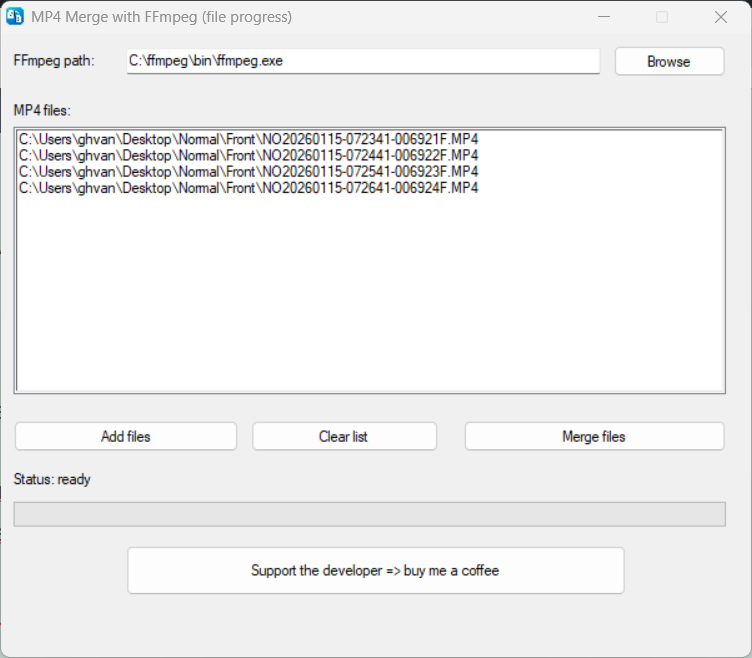
MP4 Merge is a lightweight Windows application designed specifically for merging multiple MP4 files into a single video. It uses the powerful FFmpeg tool under the hood, which ensures that your video quality remains intact and the merging process is super fast.
This is especially useful for dashcam users who want to compile an entire trip or incident into one continuous video for easier viewing, editing, or sharing.
Key Features
- Easy-to-use GUI: Simply select your FFmpeg path and choose the MP4 files you want to merge.
- Multiple file support: Add as many files as you need.
- Support the developer: A “Buy me a coffee” button lets you support future development.
How to Use MP4 Merge
- Select FFmpeg: The first time you open the app, locate your
ffmpeg.exefile. The app remembers this path for future use. - Add your dashcam MP4 files: Click the “Add files” button and select all the clips you want to merge.
- Merge: Click “Merge files” and let the app combine them. A progress bar will show you the current progress.
- Save your video: Choose a filename and location for your merged MP4.
It’s that simple! No complicated commands, no command-line interface—just a clean, user-friendly application to streamline your dashcam workflow.
Why Use MP4 Merge?
- Speed: FFmpeg handles merging efficiently without re-encoding when possible.
- Reliability: MP4 Merge works with all standard MP4 files, including dashcam recordings in HEVC/H.264.
- Free and lightweight: The app is small, requires no installation, and doesn’t require heavy system resources.
- Support the developer: If you like the app, you can buy the developer a coffee directly from the GUI.
Conclusion
If you regularly record trips with your dashcam and struggle with fragmented video files, MP4 Merge with FFmpeg is a simple and effective solution. It puts the power of FFmpeg into a clean GUI, giving you a fast, reliable way to combine your videos into one seamless file.
Download the app today and make managing your dashcam videos effortless!
Download MP4-merge here
Name: MP4-merge.exe
Size: 1328640 bytes : 1297 KiB
MD5: 3e10fa75b0752e1d257d38350063e8c7
SHA256: 7ccd90276d02f48cf39e4a1c0f36ca95ff7cd911af6ff2c02a76813504dff04f
See VirusTotal score
FFmpeg can be found here:
https://ffmpeg.org/download.html
=> https://www.gyan.dev/ffmpeg/builds/ffmpeg-git-essentials.7z